

Best overall: supervised AI overflow. Best for routine appointment requests: booking-connected AI. Best for complex routing: a bespoke call workflow. Best for closed hours: approved message capture. The best AI receptionist for dental practices in 2026 fits a defined reception task without taking clinical decisions away from your team.
- Choose supervised overflow as your starting AI receptionist for dental practices; keep clinical decisions with your team.
- Archii’s Monshi is an AI phone-answering product for UK small businesses; assess it against dental-specific requirements.
- Appointment booking needs demonstrated diary rules, patient checks and reliable confirmation before you enable it.
- Compare call handling, human handover and patient-data controls before choosing a voice or feature list.
Why this matters
A pleasant voice is not a reception process. Your practice needs the right information passed to the right person, with no invented appointment, treatment advice or promise of a callback nobody owns.
Archii designs and runs its own software products, including Monshi AI phone answering. Archii’s Monshi is a phone-answering option for UK small businesses to assess against a dental-specific call script. That is the useful starting point: a defined job and a demonstration, not an assumption that general phone answering equals dental reception.
For your 2026 shortlist, compare operating approaches before suppliers. Decide what the assistant is allowed to do, what it must refuse and how a person takes over. Then ask each supplier to demonstrate those boundaries.
What makes the best AI receptionist for dental practices?
Use these six criteria before judging the sound of a demonstration:
- Task boundaries: Separate answering practice questions, collecting requests, changing appointments and handling clinical concerns. Approval for one does not imply approval for another.
- Human handover: Define who receives an escalated call, what information travels with it and what happens when nobody answers.
- Booking accuracy: Require a demonstration against your appointment rules. A message requesting an appointment is not a confirmed booking.
- Patient-data controls: Check what is recorded, where it goes, who can access it and how long it remains there.
- Failure handling: Test unclear speech, interrupted calls, unavailable systems and requests outside the agreed scope. The assistant needs a safe stopping point.
- Reception usability: Show the resulting message to the person who will act on it. Useful call handling ends with an actionable task, not just a transcript.
Choose the narrowest setup that completes a useful task reliably. Extra permissions belong behind extra checks.
Dental AI receptionist approaches at a glance
These are operating models, not claims that every supplier offers the same functions. Treat each capability as something to demonstrate before purchase.
| Rank and approach | Best for | Standout design choice | Key limitation |
|---|---|---|---|
| 1. Supervised AI overflow | Supporting reception while staff are occupied | Collect a request and assign human follow-up | Staff still need to resolve the request |
| 2. Booking-connected AI | Defined routine appointment transactions | Apply approved rules to a connected diary | Incorrect rules or connections can create booking errors |
| 3. Bespoke call workflow | Practice-specific routing and administration | Design the handoff around your actual process | Requires specification, testing and ongoing ownership |
| 4. Approved out-of-hours message capture | Collecting non-clinical requests while closed | Make opening hours and next steps explicit | Does not resolve the underlying request during the call |
The ranking favours a controlled starting point over broader automation. A practice with a proven diary connection and clear booking rules has a different decision from one still deciding who handles messages.
1. Supervised AI overflow: best for a controlled first rollout
Supervised AI overflow handles a defined reception task when your team cannot take the call. Start with collecting the caller’s request and preferred contact details, then place responsibility for the response with a named staff role.
This approach keeps the assistant’s authority narrow. It should not describe a requested appointment as booked or offer clinical reassurance just because the caller asks for it.
Supervised AI overflow pros
- Gives you a specific workflow to test without immediately granting diary access.
- Keeps decisions about treatment and appointment suitability with your team.
- Lets reception assess whether the captured information supports useful follow-up.
Supervised AI overflow cons
- Creates follow-up work rather than completing every request during the call.
- Fails operationally if messages have no named owner.
- Leaves callers waiting when your response process is unclear or unattended.
Best for: Practices introducing AI phone answering while retaining staff control over the next action.
Monshi belongs on a product shortlist for this assessment because Archii identifies it as AI phone answering for UK small businesses. Ask for a demonstration of your proposed overflow workflow. Assess the actual message, handover and failure behaviour rather than assuming particular functions from the product category.
For a 2026 pilot, require the assistant to distinguish a captured request from a completed action. Reception should see what the caller wanted, what remains unresolved and who needs to respond.
Verdict: Buy only after the supervised workflow passes your call tests.
2. Booking-connected AI: best for defined routine appointments
Booking-connected AI aims to complete an appointment transaction rather than send a message to reception. That requires an authorised connection to the diary and rules governing what the assistant can book, change or cancel.
Do not accept a spoken confirmation as proof that the transaction worked. Check the resulting diary entry and what the patient receives.
Booking-connected AI pros
- Can complete an approved transaction without a separate callback when the connection and rules work.
- Gives you a clear outcome to verify: the correct appointment in the correct diary.
- Lets you restrict automation to appointment types your practice explicitly approves.
Booking-connected AI cons
- Depends on accurate appointment rules and a working system connection.
- Needs a defined response when a caller’s identity or eligibility is unclear.
- Requires testing for conflicts, failed changes and interrupted confirmations.
Best for: Practices with documented booking rules and a supplier that can demonstrate the required diary connection.
Write down the permitted appointment types before a demonstration. Specify the practitioner, location and any information reception normally checks. Requests outside those boundaries should return to staff rather than produce an improvised booking.
Test an unavailable slot as carefully as an available one. Also test a caller who changes their mind halfway through. Your acceptance decision should follow the recorded outcome, not the smoothness of the conversation.
Verdict: Hold until your own booking rules pass end-to-end testing.
3. Bespoke call workflow: best for practice-specific handoffs
A bespoke call workflow starts with your reception process rather than a generic feature menu. It defines how a request moves between the caller, the assistant, your systems and the person responsible for resolving it.
Consider this route when standard configurations cannot express a necessary handoff. Do not commission bespoke software merely to avoid making an operational decision.
Bespoke call workflow pros
- Lets you specify the information each staff role needs before taking action.
- Makes exceptions and escalation routes part of the design brief.
- Provides a place to define ownership across disconnected administrative steps.
Bespoke call workflow cons
- Requires your team to explain and approve the underlying process.
- Adds responsibility for testing and maintaining the workflow as it changes.
- Does not make an unclear reception policy clearer by itself.
Best for: Practices whose necessary routing or administrative steps cannot be demonstrated in a standard setup.
Archii designs, builds and runs its own software products. That makes product ownership a relevant discussion point when you enquire about a software project; it does not establish a particular dental integration or delivery commitment.
For a bespoke brief in 2026, map Request capture, Staff review, Approved action and Outcome check. Each stage needs an owner and a stopping rule. Keep that map short enough for reception staff to challenge it.
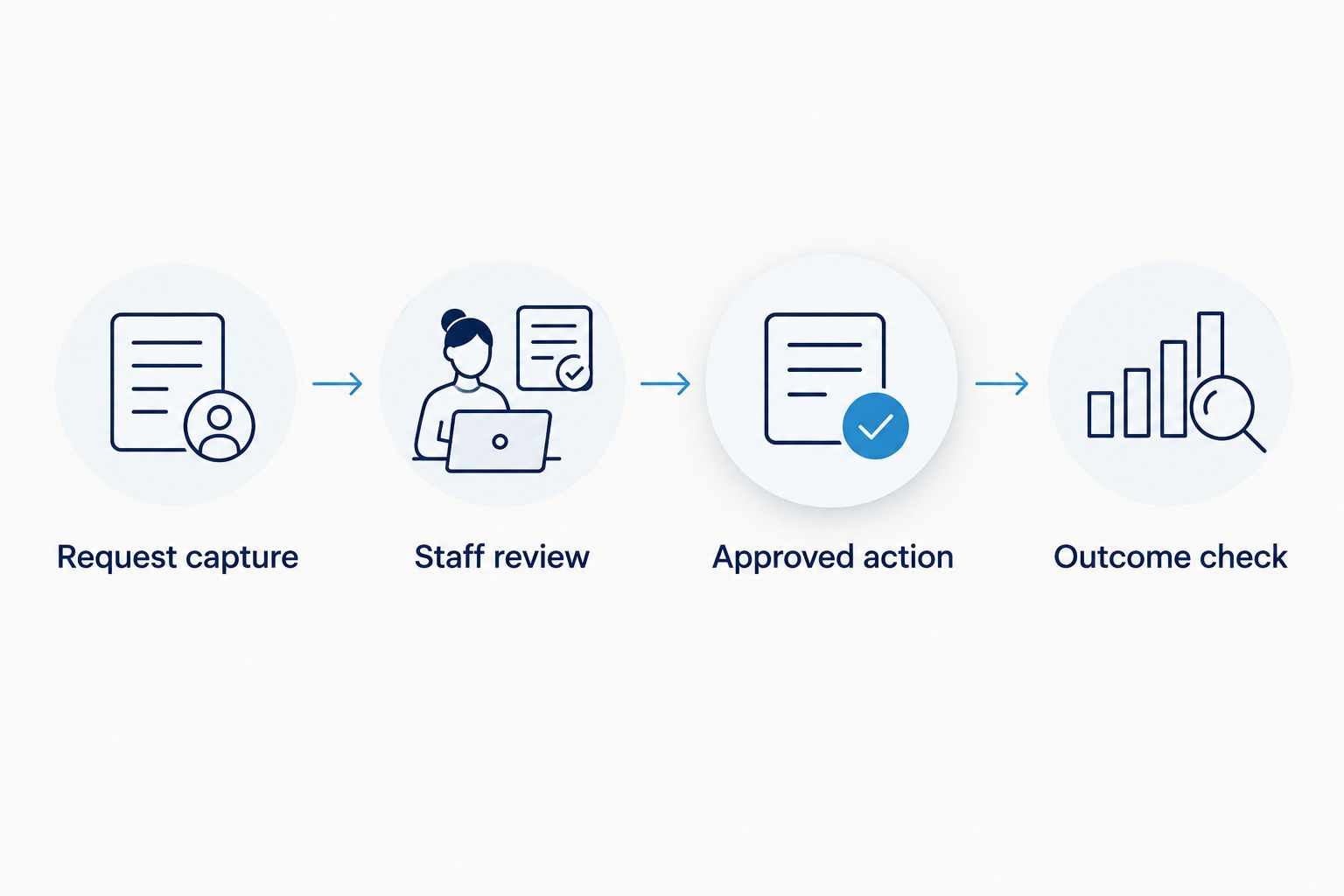
Write the acceptance criteria before choosing the interface. A clear handoff with a plain screen is more useful than an attractive conversation that leaves staff guessing what happened.
Verdict: Hold until the process, responsibilities and acceptance criteria are agreed.
4. Approved out-of-hours capture: best for non-clinical messages
Out-of-hours message capture records a request while the practice is closed. Its job is to explain that boundary clearly and collect the information your team needs when it returns.
Use practice-approved wording for urgent concerns and access to help. The assistant must not turn an administrative conversation into clinical advice.
Out-of-hours capture pros
- Gives non-clinical callers a defined way to leave their request.
- Lets you state opening hours and the next administrative step consistently.
- Separates collecting information from promising an immediate response.
Out-of-hours capture cons
- Does not complete the caller’s underlying request.
- Needs a staffed review process when the practice reopens.
- Requires careful wording so callers do not mistake message capture for clinical support.
Best for: Practices seeking a clear closed-hours process for non-clinical requests.
For your 2026 configuration, check the closure message against your actual arrangements. Include exceptional closures in that review rather than treating ordinary weekly opening hours as permanent.
Avoid vague assurances such as an immediate callback unless your practice has approved and staffed that commitment. A truthful boundary is better than a comforting promise your team cannot fulfil.
Verdict: Buy only for a clearly bounded message-taking role with approved escalation wording.
How to test your shortlist before committing
Use the same script for each supplier. Ask a receptionist and the practice manager to review the result independently; neither should need the supplier to explain what happened.
Run a suggested 10-call acceptance exercise, not a performance benchmark. Include a routine enquiry, appointment request, cancellation, unclear name, interrupted call, unavailable slot, failed handover, clinical question, closed-hours request and request to correct captured information.
Check three things after each call:
- Caller outcome: Was the next step clear and accurate?
- Staff task: Can reception act without reconstructing the conversation?
- System record: Does the recorded outcome match what the assistant told the caller?
Assign 2 staff reviewers and schedule a 30-minute review after the exercise. These are practical starting points for your test plan, not evidence that a system is safe or effective. Repeat failed scenarios after changes.
Patient-data questions belong in the buying decision
Dental calls can include health information. Under UK GDPR, health data is special category personal data, so your assessment needs to cover the relevant lawful basis and special category condition, not just whether a supplier mentions encryption.
Ask what the service records, whether it creates transcripts, where information is processed and which other organisations receive it. Establish access permissions, retention, deletion and the contractual responsibilities before live use.
Also ask whether recordings or transcripts are used to improve models. Get the answer in writing and assess it against your intended use. A reassuring demonstration does not replace a documented data-protection assessment.
How the approaches are ranked
Supervised overflow ranks first because it provides a narrow starting scope with staff retaining responsibility for resolution. Booking-connected AI ranks next for a more specific transaction; bespoke workflows address process complexity, while closed-hours capture serves a separate administrative need.
This is a scope-based ranking, not a measured supplier league table. Your final choice should follow the task boundaries, handover quality, booking checks, data controls and failure tests described above.
Which AI receptionist should your dental practice choose?
Start with supervised overflow unless you have a demonstrated reason to grant broader permissions. Keep the first release focused on one useful reception task, then review the actual outcomes before expanding it.
If you are considering Archii’s Monshi, bring a call script to the discussion. Use the contact page to explain the reception task, the systems involved and the outcome you need demonstrated. Do not begin with a request to automate the whole front desk.
FAQ
What’s the best AI receptionist for dental practices in 2026?
Supervised AI overflow is the recommended starting approach in this guide. It keeps the initial task narrow while staff retain responsibility for clinical decisions and unresolved requests.
Can an AI receptionist book dental appointments?
Appointment booking requires an authorised diary connection and approved booking rules. Verify the resulting diary entry and patient confirmation before enabling live transactions.
Is Monshi a dental-specific receptionist?
Archii describes Monshi as AI phone answering for UK small businesses. Assess dental-specific requirements through a demonstration rather than assuming specialist booking, triage or practice-system functions.
Can AI reception replace our dental receptionist?
Do not treat phone answering as proof that a system can replace your receptionist. Define the administrative tasks it can complete and retain staff ownership of exceptions and clinical concerns.
What should an AI receptionist do with an urgent dental call?
The assistant should follow your practice-approved escalation wording and boundaries. It should not invent treatment advice or promise access to help that your practice has not arranged.
What patient-data checks should we make?
Check recording, transcription, access, retention, processing locations and any model-improvement use. Assess the lawful basis, special category condition and contractual responsibilities for your intended workflow.
What should we ask to see in a demonstration?
Ask to see your own call scenarios and the resulting staff tasks or diary entries. Include failed handovers, unavailable appointments and unclear requests, not just a successful routine call.
One last thing
A transcript is not a completed task. During your 2026 evaluation, ask a receptionist to act on a captured request without listening to the original call. If they cannot tell what to do next, improve the handoff before adding more automation.